
Recently, npm revoked all classic tokens, forcing developers to migrate to the new token format.
This creates a significant challenge if you rely on automated workflows that publish packages to npm from CI, such as automate-release. With +500 repositories under my management, manually updating each one was out of the question.
This guide shows how to automate the bulk update of NPM_TOKEN secrets across multiple GitHub repositories using github-create-secret and the GitHub API.
Get your NPM token
Before running the script, you’ll need to create a new granular access token. npm classic tokens have been permanently revoked, so you’ll need to use the new token format.
You can create a token in two ways:
- Via the web interface: Visit
https://www.npmjs.com/settings/{USER}/tokensand create a new granular token - Via the CLI: Use the new
npm token createcommand (documentation available in the npm CLI docs)
For CI/CD workflows, make sure to:
- Enable the
Bypass two-factor authentication (2FA)option (required for noninteractive automated workflows) - Set an appropriate expiration (write tokens are limited to 90 days maximum)
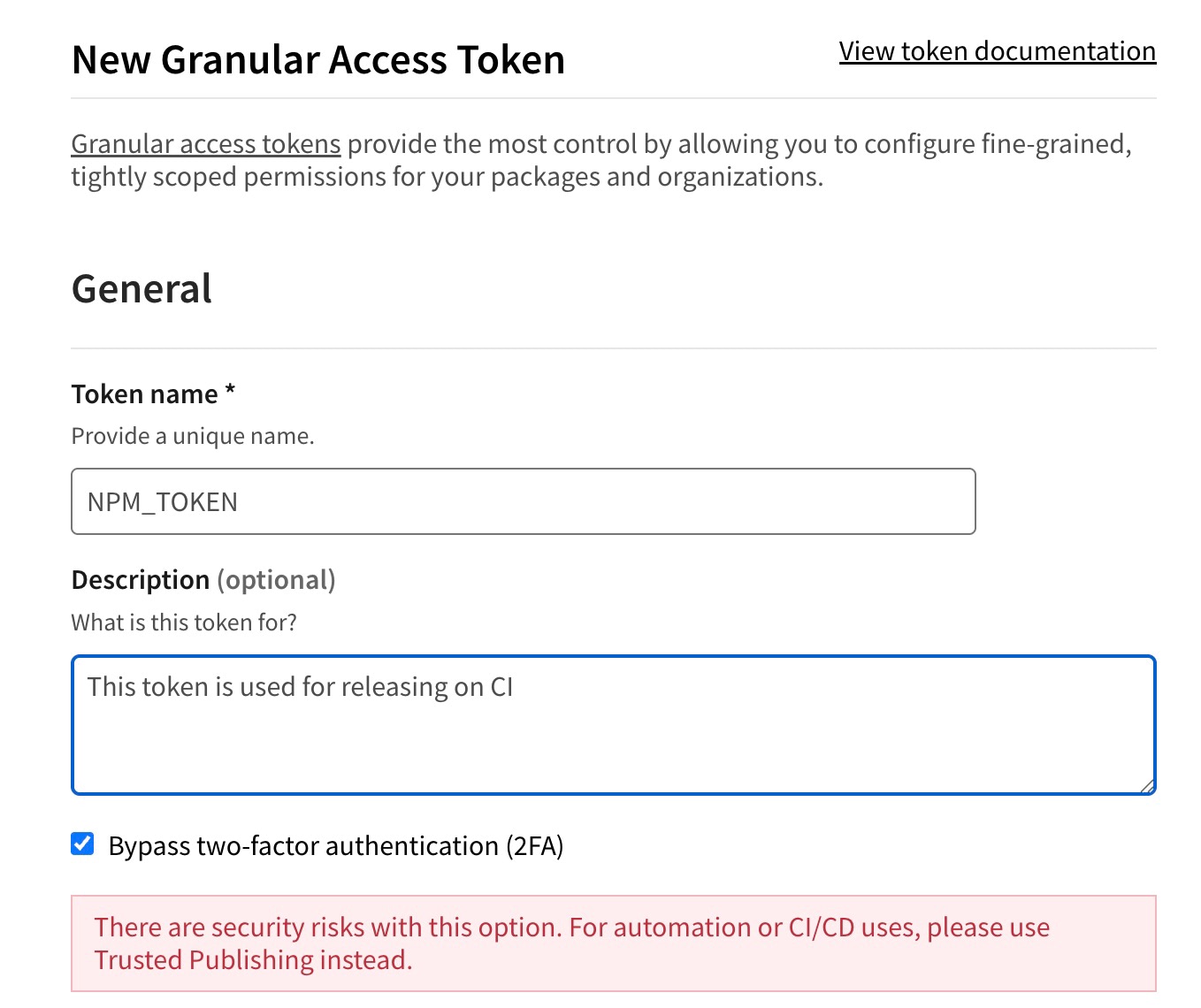
Store it in your environment:
export NPM_TOKEN='your-new-npm-token'
export GH_TOKEN='your-github-token'
Set up the GitHub API client
We’ll use Octokit to authenticate with GitHub and fetch repository information. The client needs a GitHub personal access token with repo scope.
To create a GitHub personal access token:
- Go to GitHub Settings → Developer settings → Personal access tokens → Tokens (classic)
- Click Generate new token (classic)
- Give it a descriptive name (e.g., “Bulk secret updater”)
- Select the
reposcope (this grants full control of private repositories) - Click Generate token and copy it immediately
Store it in your environment (along with your npm token):
export GH_TOKEN='your-github-token'
Then initialize the Octokit client:
import { Octokit } from '@octokit/rest'

const octokit = new Octokit({ auth: process.env.GH_TOKEN })
List repositories
To update secrets across multiple repositories, we first need to fetch the list of repositories from GitHub. Create a function that uses Octokit’s pagination to handle large numbers of repositories automatically.
async function listRepos (username, { withForks = false } = {}) {
  const repos = await octokit.paginate(
    octokit.rest.repos.listForAuthenticatedUser,
    {
      username,
      per_page: 100,
      type: 'all'
    }
  )

  return withForks ? repos : repos.filter(repo => !repo.fork)
}
Create secret helper function
The github-create-secret library allows you to create, update, and check repository secrets. When called without a value, it returns a boolean indicating whether the secret exists.
import createSecret from 'github-create-secret'

const createNpmTokenSecret = async (repo, opts) => {
  return await createSecret({
    owner: repo.owner.login,
    repo: repo.name,
    token: process.env.GH_TOKEN,
    name: 'NPM_TOKEN',
    ...opts
  })
}
Filter repositories by organization
Define which organizations you want to target. The script will only process repositories belonging to these organizations.
const GH_USERNAME = 'Kikobeats'

const GH_ORGANIZATIONS = [
  'kikobeats',
  'microlinkhq',
  'teslahunt',
  'urlint',
  'achojs'
]

const repos = await listRepos(GH_USERNAME).then(repos =>
  repos.filter(repo => GH_ORGANIZATIONS.includes(repo.owner.login))
)

console.log(`Found ${repos.length} repositories`)
Update secrets in bulk
The script iterates through each repository, checks if it has the NPM_TOKEN secret, and updates it if found. The upsert: true option allows overwriting existing secrets.
for (const repo of repos) {
  const hasSecret = await createNpmTokenSecret(repo)
  if (hasSecret) {
    await createNpmTokenSecret(repo, {
      value: process.env.NPM_TOKEN,
      upsert: true
    })
    console.log(`https://github.com/${repo.full_name} updated`)
  }
}
The script works by first checking if a repository has the NPM_TOKEN secret (when called without a value, createSecret returns a boolean). If the secret exists, it updates it with the new token using the upsert: true option, which allows overwriting existing secrets.
Putting all together
Here’s the complete script combining all the pieces together:
import { Octokit } from '@octokit/rest'
import createSecret from 'github-create-secret'

const octokit = new Octokit({ auth: process.env.GH_TOKEN })

async function listRepos (username) {
  const repos = await octokit.paginate(
    octokit.rest.repos.listForAuthenticatedUser,
    {
      username,
      per_page: 100,
      type: 'all'
    }
  )

  return repos.filter(repo => !repo.fork && !repo.archived)
}

const createNpmTokenSecret = async (repo, opts) => {
  return await createSecret({
    owner: repo.owner.login,
    repo: repo.name,
    token: process.env.GH_TOKEN,
    name: 'NPM_TOKEN',
    ...opts
  })
}

const GH_USERNAME = 'Kikobeats'

const GH_ORGANIZATIONS = [
  GH_USERNAME,
  'microlinkhq',
  'teslahunt',
  'urlint',
  'achojs'
]

const repos = await listRepos(GH_USERNAME).then(repos =>
  repos.filter(repo => GH_ORGANIZATIONS.includes(repo.owner.login))
)

console.log(`Found ${repos.length} repositories`)

for (const repo of repos) {
  const hasSecret = await createNpmTokenSecret(repo)
  if (hasSecret) {
    await createNpmTokenSecret(repo, {
      value: process.env.NPM_TOKEN,
      upsert: true
    })
    console.log(`https://github.com/${repo.full_name} updated`)
  }
}
This approach saved me countless hours of manual work and ensured all repositories were updated consistently.